Collaboration
A noticeboard that gathers the document reviews waiting on you and the newest unresolved comments from across your compliance records, each with a link to the record where the work actually happens.
While people draft policies, procedures, compliance documents and evidence, they leave notes for one another and ask a colleague to check a document before it is approved. Those conversations live on each record's own detail page, so a request can sit unread for weeks in a corner of Aegis you rarely open. The Collaboration page pulls two of those streams into one place — the reviews (requests to check a document before it is approved) where you are the named reviewer, and the most recent open comments (notes left on a record that nobody has marked as resolved) from anywhere in the team.
Read it as a noticeboard rather than a workspace: it lists and links, while the
reading, replying and deciding happen on the record you open from here. You
reach it from the
Collaboration entry in the Documents group of the left
sidebar, at /collaboration.
Who uses it
Opening the page needs the View Comments permission
(collab:comment:read), which all four standard roles hold, so
Admin,
Manager,
Contributor and
Viewer all see the same two lists.
Anyone without it is sent to /unauthorized rather than shown a
blank page. Collaboration is also an operator-provisioned module: if your tenant
does not have it switched on, the sidebar entry does not appear and the route
refuses the request.
What you can then do on the record you open differs sharply by role:
| Role | On the collaboration panel of a record opened from this page |
|---|---|
| Admin |
Read the comment thread, post a comment, see the reviews list, and
record a decision — Approve,
Request changes or Reject.
|
| Manager | The same as Admin: read, comment, see reviews, and decide them. |
| Contributor | Read the thread, post a comment and see the reviews list — but not decide a review. The three decision buttons are not rendered. |
| Viewer |
Read the comment thread only. No comment box, and the
Reviews section of the panel is hidden altogether.
|
Nothing stops a review being assigned to a
Contributor, and it will
duly appear in their Reviews assigned to me list. When they
open the record, though, the decision buttons are withheld, because
recording a decision needs the Review & Decide permission
(collab:review:decide) that only
Manager and
Admin hold. If you are routing
approvals, name a Manager or an Admin as the reviewer.
What's on this screen
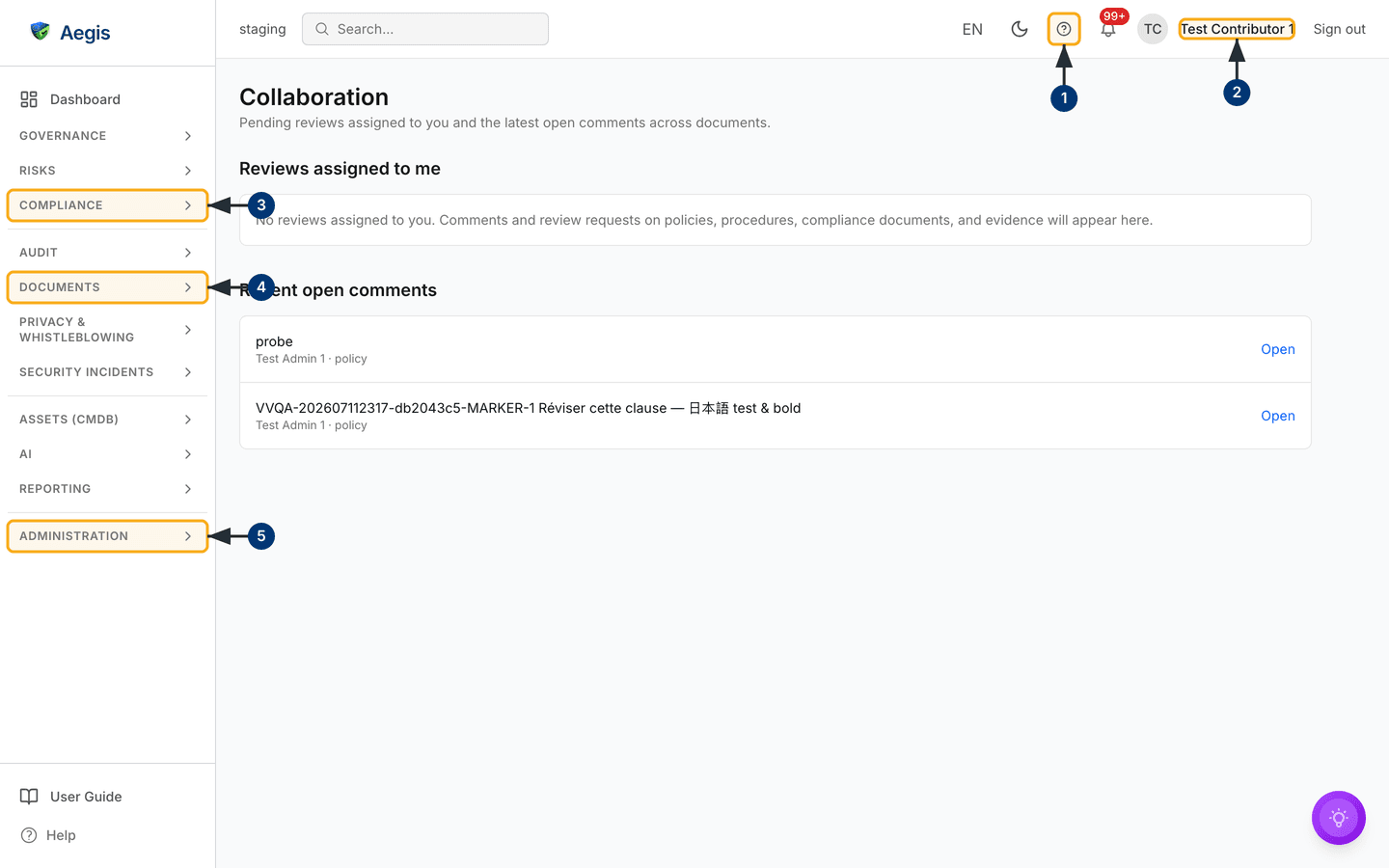
The page is deliberately plain. A header carries the title Collaboration over a one-line description — "Pending reviews assigned to you and the latest open comments across documents." There is no create button, no filter bar, no search box and no export on the page itself, so the only controls are the ones in the frame around it: the left sidebar and the top bar.
Below the header sit two stacked sections, each a bordered panel:
-
Reviews assigned to me — document reviews where you are the
named reviewer and the review is still
PendingorIn Review. Each row shows the record type followed by the word review —policy review,compliance document reviewand so on — over a second line readingRequested by, the requester's name, a middle dot and the review status. AnOpenlink sits at the right-hand end of the row. -
Recent open comments — unresolved comments from across the
whole team, not only yours. Each row shows the comment text on one line,
truncated to the width of the panel, over its author and the kind of record
it sits on joined by a middle dot, and an
Openlink at the right.
Both lists are read once when the page loads, ordered newest first, and capped
at the 25 most recent items. In the capture the two sections are in different
states, which is normal.
Reviews assigned to me has nothing waiting, so it shows its
message in place of a list: "No reviews assigned to you. Comments and review
requests on policies, procedures, compliance documents, and evidence will appear
here." Recent open comments has two rows, both left by
Test Admin 1 on a policy, each with its own Open link.
The matching empty message for the second section reads "No open comments.
Threads opened on policies, procedures, documents, or evidence will surface
here." The signed-in account in the capture is Test Contributor 1,
a Contributor.
Because the page has no controls of its own beyond those
Open links, the numbered callouts below point at the frame around
it.
- The circled question mark in the top bar opens the in-app User Guide at the chapter for the screen you are on. It is a link rather than a panel, so you leave the page and return with your browser's back control.
-
Read the signed-in name at the top right.
Reviews assigned to me is filtered to exactly this account,
so this is where you confirm you are clearing your own queue and not a
colleague's. In the capture it reads
Test Contributor 1. -
Select the
Compliancegroup in the sidebar to expand it. It holds three of the four record types these lists draw from —Policies,ProceduresandEvidence— for when you would rather browse a register than follow a link. -
The
Documentsgroup holds the fourth type,Compliance Documents, alongside theCollaborationentry that brought you to this page. The group stays collapsed until you select it. -
Administrationat the foot of the sidebar holdsSettings, whoseUserstab is where roles are assigned. If a review is sitting with someone who cannot decide it, that is put right there — read Roles overview first.
Working through a review assigned to you
Open it at the start of a session: read what is yours, clear it on the record, come back.
-
Read the row in Reviews assigned to me. It names the record
type, who requested the review, and where the review has got to —
Pendingif nobody has picked it up,In Reviewif someone has. -
Select
Openat the right of the row. For a policy or a compliance document you land on the detail page scrolled straight to its Collaboration panel. For a procedure or an evidence item the link opens the detail page, but no collaboration panel is mounted there yet — see the note below. -
In the panel, read the
Reviewssection. Each entry showsRequested byand the requester's name, the current status as a small grey badge, aReviewer:line where a reviewer is named, and any note stored with the request. -
If you hold Manager or
Admin, choose
Approve,Request changesorReject. All three buttons grey out while the decision is saved, a short "Decision recorded." confirmation appears, and the entry's status badge updates in place. The buttons only appear on reviews still atPendingorIn Review. Deciding a review that was stillPendingalso records you as its reviewer. -
Return to
/collaborationand reload. A review that is no longerPendingorIn Reviewhas dropped off the list, so what remains is what is still outstanding.
Aegis stores your choice of Request changes as its own
decision, but the review itself only has five states — Pending,
In Review, Approved, Rejected and
Cancelled — and both Request changes and
Reject move it to Rejected. There is no "changes
requested" status and no way to reopen the review, so put what you want
changed in a comment on the record, and ask for a fresh review once it is
done.
The panel that shows the thread and the review buttons is currently mounted
on policy and compliance document detail pages only. An
Open link on a procedure or
evidence row takes you to the right record, but there is
nowhere on that page to read the comment or decide the review. Comments and
reviews on those two types can still be created and read through the
collaboration API; the screens are planned but not shipped.
Following an open comment
The second list is team-wide, so a row may sit on a record somebody else owns. Scan it for what touches your work rather than trying to clear all of it.
-
Read the comment row. The first line is the comment text, cut off at the
width of the panel if it is long; the second line names the author and the
record type, so
Test Admin 1 · policyis a comment left by Test Admin 1 on a policy. -
Select
Opento go to that record. The full comment and any replies sit in theCommentssection of its Collaboration panel, each entry showing the author, a short date and time, and the complete text. Replies are indented beneath the comment they answer. -
To add your own, type in the
Add a commentbox below the thread — it takes up to 10,000 characters — then selectPost comment. The button stays disabled until you have typed something, then readsPosting…while it saves; the thread refreshes and "Comment added." appears. The box is only rendered for roles that may comment, so a Viewer will not see it.
The box always posts a new top-level comment. There is no control for replying to a particular comment, so make it clear in your text which point you are answering.
Where each Open link takes you
Aegis collects comments and reviews on four kinds of record:
| Record type shown in the row | Where Open lands |
|---|---|
policy |
The policy detail page, scrolled to its collaboration panel. |
compliance document |
The compliance document detail page, scrolled to its collaboration panel. |
procedure |
The procedure detail page. No collaboration panel is shown there yet. |
evidence |
The evidence detail page. No collaboration panel is shown there yet. |
How the two lists fill and empty
A review joins the first list when someone names you as its reviewer, and leaves
once its status moves past Pending or In Review — once
it is approved, rejected or cancelled. A comment joins the second list when it
is posted and would leave once it is marked as resolved — which nothing in the
interface currently does. The two sections are independent, so one can be full
while the other shows its empty message, as in the capture above. An empty
Reviews assigned to me means you are up to date, not that
something has gone wrong.
Aegis reserves a Request Review permission for
Contributor and above, and
a Resolve Comments permission for
Manager and
Admin, but neither has a button
anywhere in the product yet. A review request has to be raised through the
collaboration API, which is what puts rows into
Reviews assigned to me. Resolving a comment goes further
still: there is no API for it either — only internal code — so a comment
stays in Recent open comments until it ages out of the 25
most recent. Close a discussion by replying on the record so the thread
reads as finished.
Tips and limits
- Each list shows only the 25 most recent items. For the full comment history on a particular record, open that record rather than relying on this page.
- The lists reflect the moment the page loaded. Reload after deciding a review or posting a comment to see the change here.
- The reviews list is personal; the comments list is shared across the tenant. Do not read the comments list as a to-do list for you.
- Only policies, procedures, compliance documents and evidence are covered. Discussion on risks, incidents, vendors and the other registers is not gathered here.
-
The panel on a detail page also needs the
Document Collaborationlicence feature. If your tenant has the Collaboration module switched on but that feature is off, this page will still list rows while the panel on the record does not appear at all — the detail page renders without it rather than showing an error. Ask your administrator to check the licence before assuming the record is broken. - There is no AI assistance on this page. It is a plain index of what people have written and asked for.
Where this connects
The records these lists point at are covered in Policies, Procedures, Compliance documents and Evidence. For who may comment, request a review and decide one, see Roles overview. For the sidebar groups the callouts point at, see The left menu; for other work waiting on you, see Action items and the Dashboard.