Action Center
The tabbed home for organisation-wide follow-up in Aegis — today it hosts the Getting Started checklist, and it is deliberately not the same thing as Action Items or the Action Catalogue.
The Action Center is a top-level destination in the
GOVERNANCE group of the left menu. It is a container: a
strip of tabs across the top of the working area, each tab holding one
whole-programme surface. Its first tab — currently its only one — is
Getting Started, the live onboarding checklist that used to be a
page of its own. More tabs will slot in as the Action Center grows. If that
sounds thin for a chapter, that is the point of this one: three similarly named
things live in Aegis, and this page exists partly so you can tell them apart.
One name, three different things
| Name | What it is | Where it lives |
|---|---|---|
| Action Center | This screen: a tabbed shell for whole-organisation surfaces, currently holding the Getting Started checklist. |
/action-center, in the GOVERNANCE group.
|
| Action Items | A working list of individual follow-up tasks, mostly created from AI findings — each with a status a person advances. See Action Items. |
A tab on the Roadmap page — the Action Items entry in
the same GOVERNANCE group deep-links to it.
|
| Action Catalogue | A reference document, not a screen: the appendix of this guide listing every action each role can perform. See Appendix A. | In this User Guide's appendices. There is no Aegis page for it. |
Setting the tenant up? Action Center. Working a task the AI surfaced? Action Items. Checking whether your role is allowed to do something? Action Catalogue.
Who uses it
Any signed-in user can open the Action Center — there is no minimum role, so a Viewer can follow the organisation's onboarding progress read-only. What each role can do depends on the tab's content: for the Getting Started checklist, the role notes in Getting Started apply.
What's on this screen
-
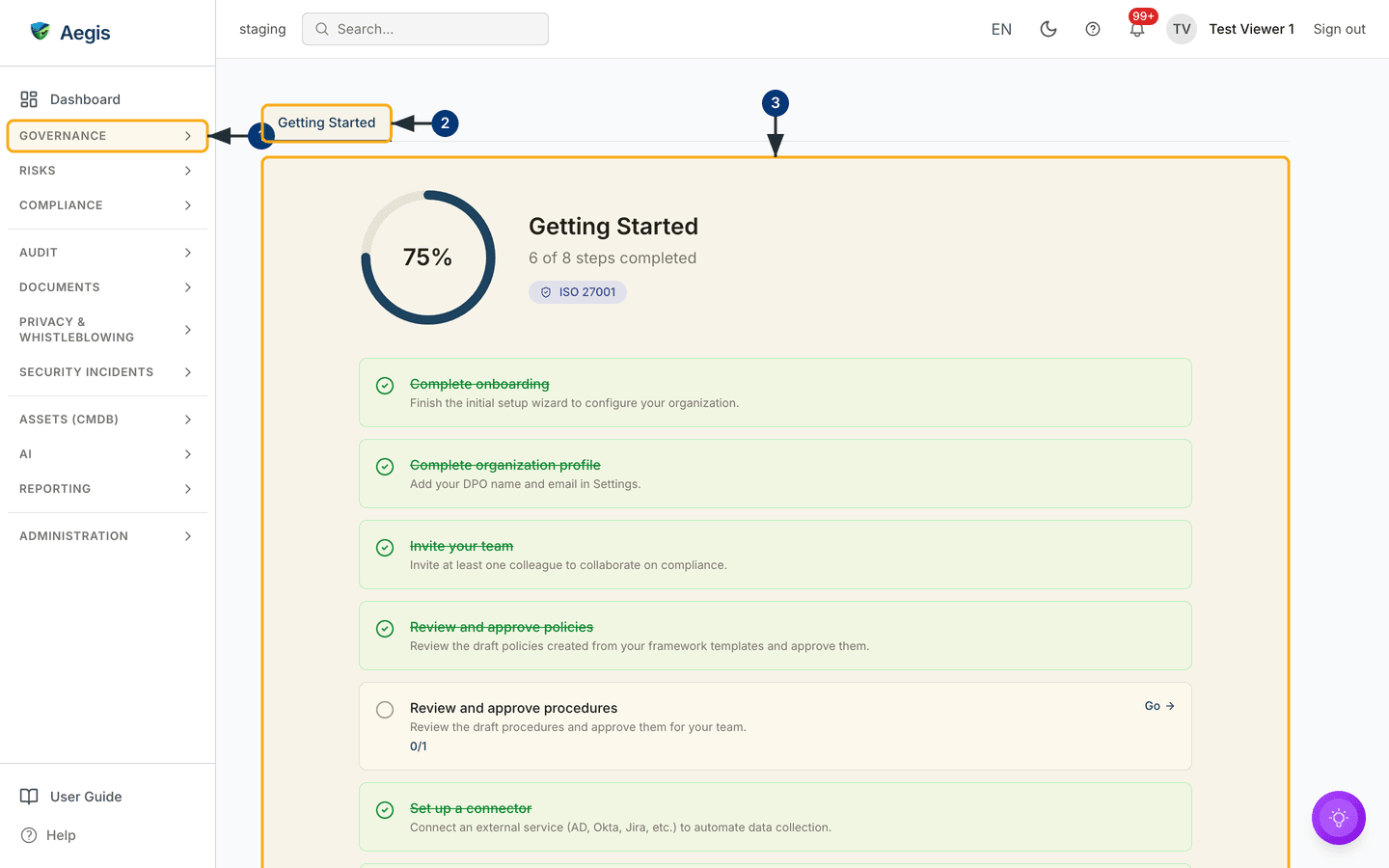
In the left sidebar, open the
GOVERNANCEgroup and selectAction Center— it is the group's first entry, above the roadmap and governance bodies. -
Across the top of the working area runs the tab strip. The
open tab —
Getting Started— is underlined in blue. Aegis remembers your last-used tab, so plain/action-centerreopens where you left off; a link with?tab=in it opens that tab directly. - Below the strip is the tab panel — the content of whichever tab is open. For Getting Started that means the progress ring, the checklist cards, the certification roadmap and the AI panel, all covered in their own chapter.
Tips and limits
-
Old links still work. Bookmarks to
/getting-startedredirect here and land on the right tab. - Tabs stay warm. Switching away from a tab does not reset it — scroll position and in-tab state survive until you leave the page.
- Expect this screen to grow. One tab today is a starting shape, not the destination; new whole-programme surfaces will appear as tabs rather than as new sidebar entries.
Where this connects
- Getting Started — the full walkthrough of the checklist this screen hosts.
- Action Items — the task list this screen is not, one entry further down the same sidebar group.
- Appendix A — The Action Catalogue — the role-by-role reference this screen is also not.
-
The left menu — where the
GOVERNANCEgroup and its entries are mapped out.