Management Reviews
Plan, run and sign off the periodic meetings where leadership looks at the quality management system's real evidence and decides what changes — with each review kept as an auditable record.
A management review is the fixed point in a management system where leadership steps back and judges whether the system is working: what the audits found, what customers said, which non-conformities are open, and what should change next. ISO 9001 (the international quality-management standard) requires them at planned intervals in clause 9.3, and prescribes what goes in (clause 9.3.2, the inputs) and what must come out (clause 9.3.3, the outputs — decisions and actions). This register holds one record per review, from scheduling through sign-off, so the evidence an auditor asks for first is always in one place.
Who uses it
- Contributor — can schedule a review, edit its inputs and outputs, and move it through its lifecycle.
- Manager — everything a Contributor can do, plus deleting a record. In practice a Manager or above usually chairs the review.
- Admin — everything.
-
Viewer — can read every review
but sees no
New management reviewbutton and cannot change anything.
What's on this screen
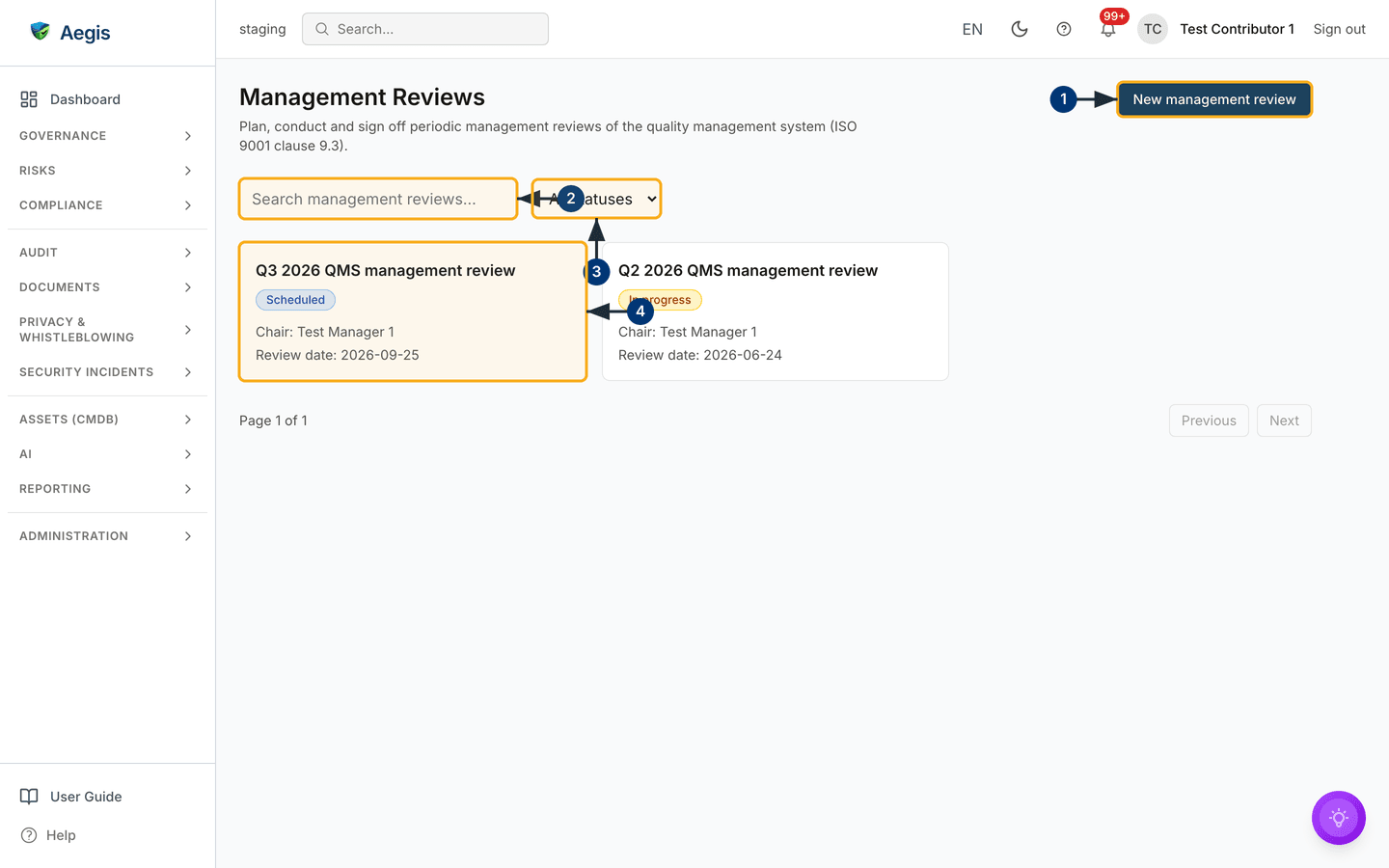
The register is a card grid: each card is one review, with its title, a status badge, the chair, the review date and — once completed — who signed it off. A search box and a status filter sit above the grid; page controls sit below it.
-
The
New management reviewbutton, top right, opens the scheduling form described below. - The search box filters the grid by title and summary as you type.
-
The status filter narrows the grid to
Scheduled,In progressorCompletedreviews. - The cards themselves — selecting one opens that review's detail page, where the inputs, outputs and sign-off live.
Schedule a review
-
Select
New management review. The form asks for aTitle(for exampleQ2 2026 QMS management review), aReview date, and aChair— the person leading the meeting. -
Leave the status at
Scheduledand save. The card appears in the grid; the inputs and outputs can be prepared any time before the meeting.
Prepare, run and sign off
Open the card to reach the detail page. It is organised around the two clause
headings —
Clause 9.3.2 — Review inputs (audit results, customer satisfaction,
process performance, non-conformities and corrective actions, risks and
opportunities, and so on) and
Clause 9.3.3 — Review outputs (improvement decisions, resource
needs, changes to the system). Fill the inputs before the meeting, record the
outputs during or after it, then close the loop with a sign-off.
-
Use the action row:
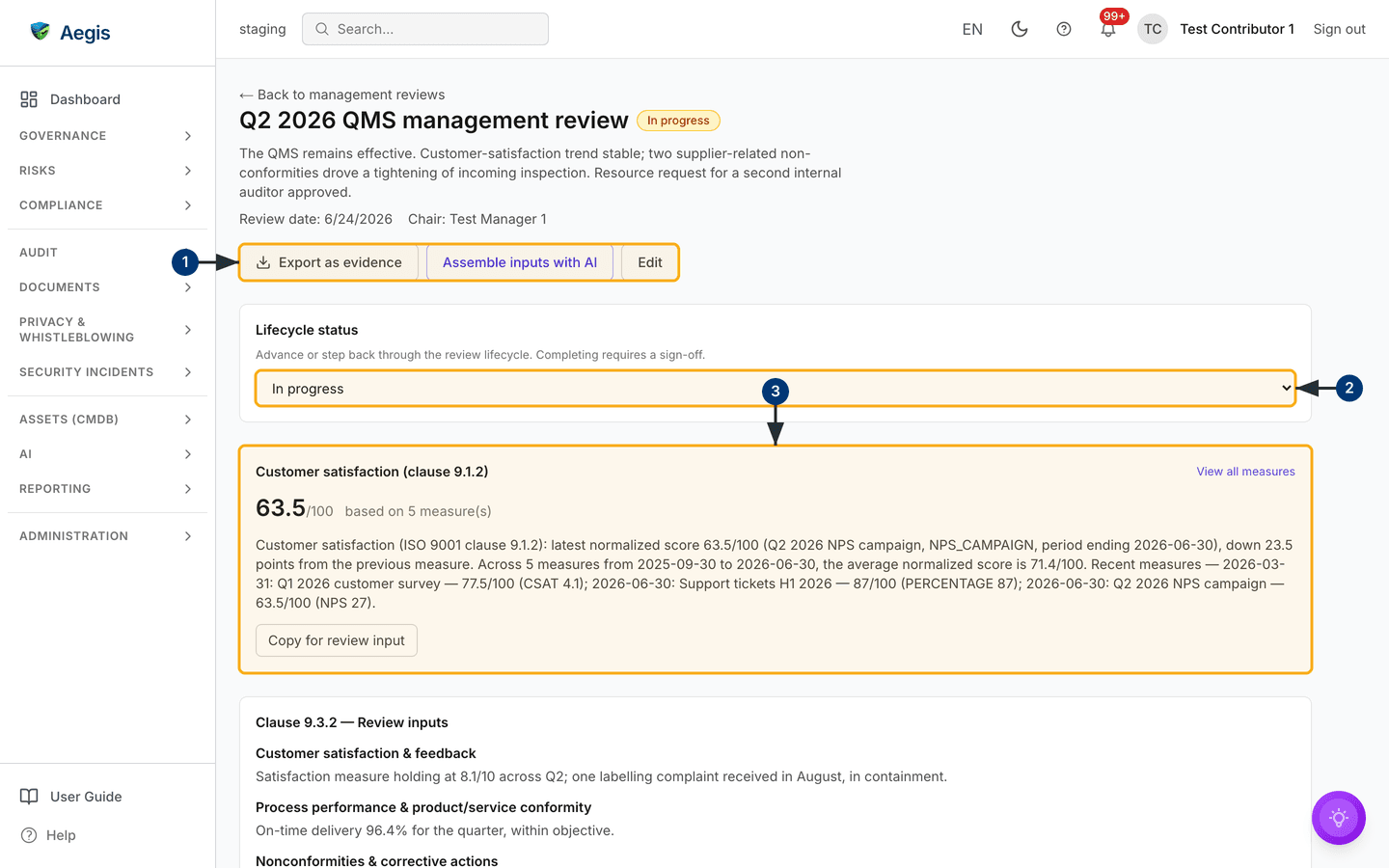
Export as evidencefiles the review into the Evidence Locker;Assemble inputs with AIdrafts the inputs from your live records (see below);Editopens every field;Deleteis Manager-and-above. -
Move the
Lifecycle statustoIn progresswhen preparation starts, and toCompletedonce the meeting is done. Completing requires a sign-off: Aegis asks you to confirm, records who signed and stamps the date. Stepping the review back toIn progressis the only way to reopen it. - Work through the clause 9.3.2 input sections, replacing drafts and blanks with what leadership actually reviewed. The customer-satisfaction input is a live panel — it shows the measured trend and links back to its source, with a one-line narrative you can copy into the review.
Further down the page, record the clause 9.3.3 outputs — the decisions and actions the review produced. Outputs that need follow-up belong in the register that owns them (a risk, a non-conformity, an action item), with a short pointer here.
The AI assist
Assemble inputs with AI drafts the clause 9.3.2 inputs from real
evidence already in Aegis: the customer-satisfaction trend, recent mock audits,
the open non-conformity register, risk posture and control-monitoring results.
Each drafted section is shown for editing first — nothing is saved until you
select Apply & save. Sections with no supporting evidence are
left blank and say so, rather than being invented; a tenant with little linked
evidence will see mostly blanks. The AI gathers and drafts; the chair reviews
and decides.
Tips and limits
- The register does not run the meeting. Aegis holds the record; the conversation happens in the room. A review whose outputs are empty will read as a meeting that decided nothing.
- Sign-off is deliberate friction. The stamp cannot be edited afterwards — only stepping the review back reopens it, and that remains visible in the audit log.
- Review at planned intervals. Most organisations run one to four a year. Schedule the next one as an output of the last.
Where this connects
- Non-Conformities — the open register is a standing review input, and review findings can raise new entries there.
- Mock Audit and Audits — audit results feed clause 9.3.2.
-
Evidence — where
Export as evidencefiles the completed review. - Control Monitoring and Risks — two more of the inputs the AI assembles from.