Program RACI Matrix
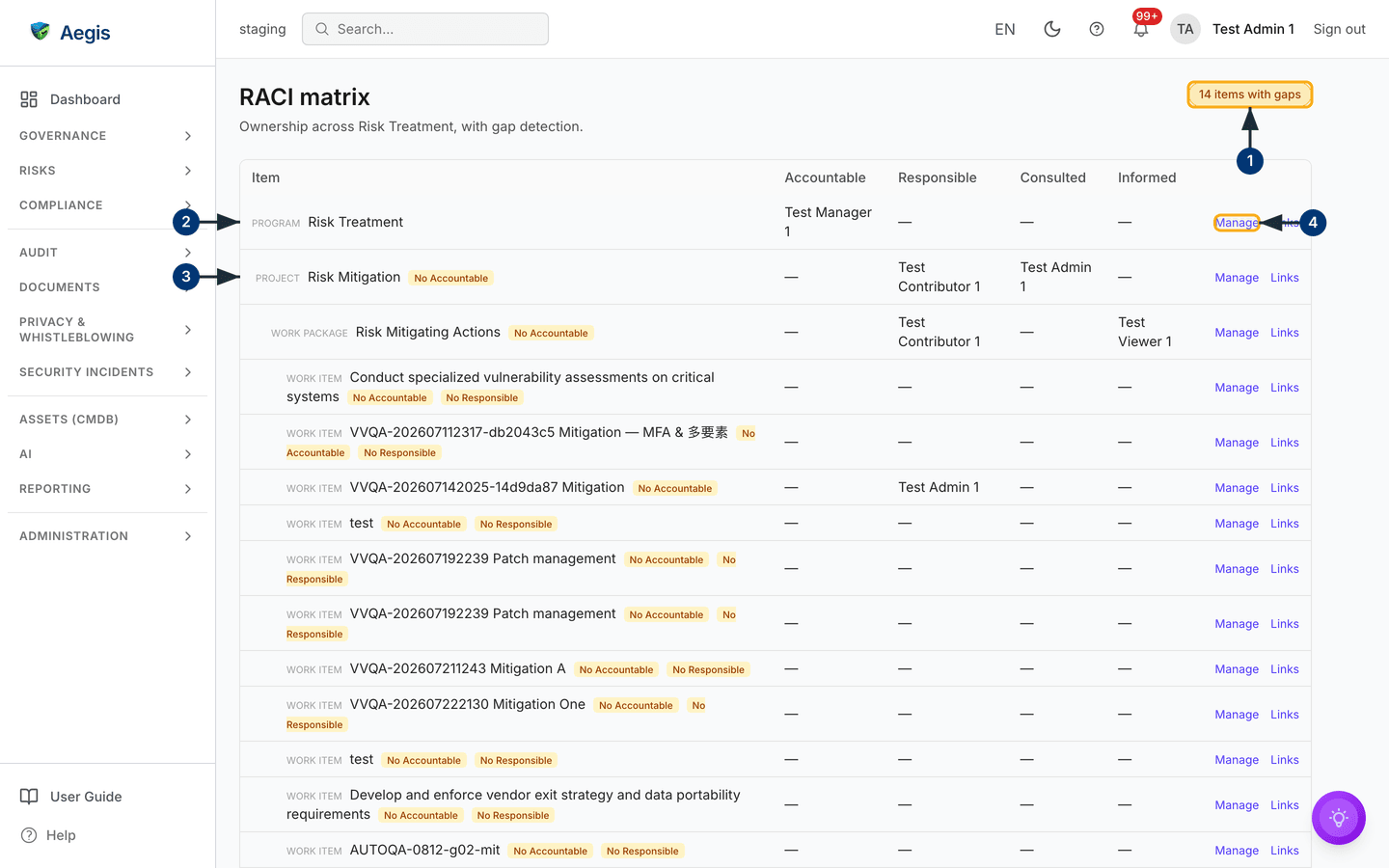
One table answering one question for every piece of a roadmap programme: who is Accountable, who is Responsible, who is Consulted, who is Informed — and where nobody is.
RACI (a way of recording ownership: Responsible does the work, Accountable answers for it, Consulted advises, Informed is kept up to date) is how auditors — and good managers — check that work has owners. The Roadmap organises delivery as programmes containing projects, work packages and work items; this page lays that whole subtree out as one matrix, one row per item, with the four RACI columns beside it. Its real value is gap detection: every item missing an Accountable, and every work item missing a Responsible, is flagged where you cannot miss it.
Who uses it
-
Viewer
Contributor
Manager
Admin — every role can read the
matrix; the row action shows
Viewwhen you cannot change assignments. - Changing assignments needs manage rights on that programme: an Admin, the programme's owner, or someone the owner has added as a programme member with a managing tier. A Manager without programme access is refused, with a clear message.
How to get there
The page lives at /programs/<programme-id>/raci and has no
entry of its own in the left menu. Two roads lead in: the notification you
receive when someone assigns you a RACI role links straight here, and the
address itself can be bookmarked per programme — each programme has exactly one
matrix. The programmes themselves are managed on the
Roadmap.
What's on this screen
-
The header reads
RACI matrixwith the programme named beneath — "Ownership across Risk Treatment, with gap detection." To its right sits the verdict pill: greenNo RACI gaps, or an amber count such as3 items with gaps. -
Each row is one item of the programme subtree, indented by level and tagged
Program,Project,Work packageorWork item. An amber badge on the row names its gap —No Accountable,No ResponsibleorMultiple Accountable. - The four columns list the assigned people by name; an em-dash means nobody. Accountable holds at most one name — Responsible, Consulted and Informed can hold several.
-
At the row's end,
Manage(orView) opens the assignment panel for that item, andLinksshows the item's governance links — the policies, risks and other records it is connected to.
Assign a role
-
Select
Manageon the row. A panel opens for that item, listing the current assignments grouped by role. -
Pick the
Role— Responsible, Accountable, Consulted or Informed — and theUser, then selectAssign. The person is notified at once, and the notification links them back to this matrix. -
Remove an assignment with
Removebeside it. The matrix and the gap count refresh as you work.
The rules the matrix enforces
| Rule | What happens |
|---|---|
| Exactly one Accountable per item | Assigning Accountable replaces whoever held it — no confirmation step, so check the column first. |
| A work item keeps at least one Responsible | Removing the last Responsible from a work item is refused: assign the replacement first, then remove. |
| Every gap is flagged, none is blocked | Aegis flags missing owners but never fills them in — closing a gap is always a person's decision. |
Tips and limits
-
Work the amber pill down to
No RACI gapsbefore an audit or a management review — the matrix is the evidence that ownership exists, and the pill is its summary. - Assignments name people, not job titles. When someone leaves, their rows keep their name until reassigned — an occasional pass over the matrix keeps it honest.
-
The matrix covers roadmap items only. Ownership of policies, risks and
controls lives on those records themselves; use
Linksto hop from a roadmap item to the governed records behind it.
Where this connects
- Roadmap — where programmes and their subtrees are created and planned.
- Action Items — the day-to-day work surface for what these items produce.
- Governance Bodies — the committees that hold the Accountables to account.