Scenario: HR duties in Aegis
HR meets the compliance programme at four moments — a joiner, a leaver, the training round, and the day a data-subject request lands in the HR mailbox.
This chapter follows Hannah, an HR officer. She is not a compliance specialist and does not need to be: her HR system remains the place where people are hired, moved and offboarded, and Aegis reads from it rather than replacing it. What Aegis adds is the compliance view of her work — an employee register the auditors trust, a training record, a policy acknowledgment trail — and one legal duty that must never sit in a mailbox: the data-subject request (DSR — a person exercising their GDPR rights over the data you hold about them).
Who you are in Aegis
An HR officer typically holds
Contributor — enough to open
the employee register at /hr, read the training record, and log
records. A Viewer is turned away
from /hr, so if that page refuses you, that is the role gate. The
one-time setup — registering the HR provider on
Settings → HR Integrations, authoring offboarding templates,
setting the privacy switches — needs
Manager or
Admin, and logging a DSR needs
Manager too. The job-title table
in What each role can do covers the
neighbouring roles.
The register you work from
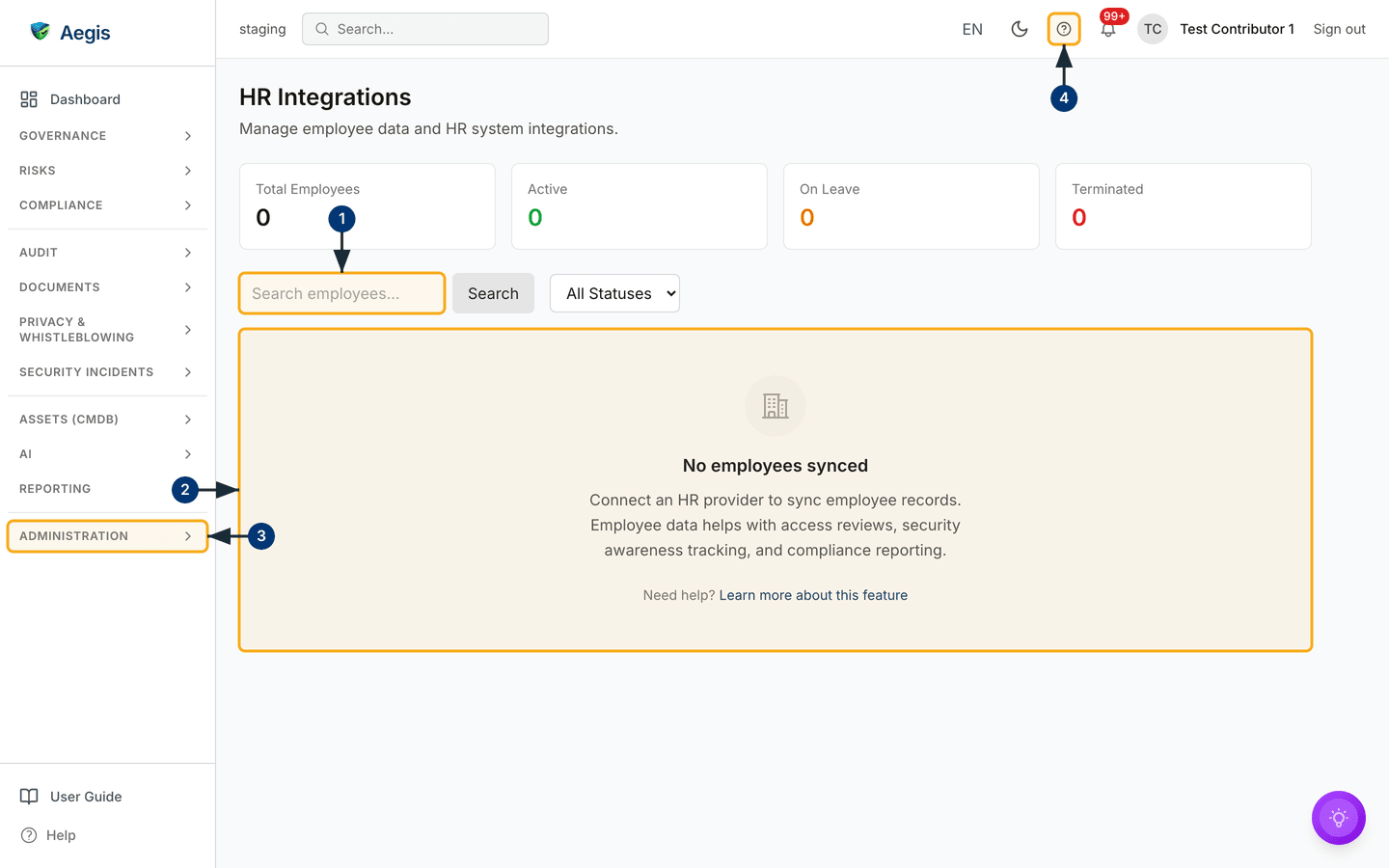
HR sits in the Administration group of the left menu,
at /hr. Four counter cards — Total Employees,
Active, On Leave, Terminated — sit above
a read-only table synced from your HRIS (the human-resources information system
that already holds your staff records). Nothing is typed in here: a correction
is made in the HR system and arrives on the next sync. The full walkthrough of
this screen, including registering the provider, is
HR Integrations.
A joiner arrives
Hannah hires a new analyst. The record is created in the HR system as always; her Aegis duties are the compliance wrapper around it.
-
Let the sync bring the person in. After the next sync run,
the new row appears on
/hrwith anActivebadge. If the counters have not moved, ask whoever operates your instance when the sync last ran — it is an on-demand job, not a schedule. - Ask an Admin for an Aegis account only if the job needs one. Most staff never sign in. If the role does need access, name the right role when you ask — Viewer for read-and-acknowledge duties, Contributor for day-to-day record work. Aegis is invitation-only; there is no self-registration.
-
Point the joiner at their reading and training. Policies
marked with required readers expect an acknowledgment from each new person,
and the induction security-awareness course should end as a
Completedrow in Security Awareness. Scenario: an ordinary working week is written for the joiner's side of exactly these steps — it makes a good welcome-pack link.
A leaver departs
Departures are where auditors look hardest: an account that outlives its owner is a standing finding. The leaver is processed in the HR system; in Aegis, Hannah checks the trail it leaves.
-
Confirm the register caught it. After the sync, the
person's row shows a red
Terminatedbadge. The row stays — deliberately — so an auditor can see the person was in scope while employed. -
Ask an Admin to deactivate any Aegis account the leaver held.
Deactivation blocks sign-in and revokes open sessions at once, while the
person's records and audit history stay intact. It is done from
Settings → Users, described in What each role can do. -
Work through your offboarding checklist. If a Manager has
authored offboarding templates under
Settings → HR Integrations, use them as the list of steps — but carry the steps out in your real systems. The templates record your intended process; they do not run it, and a leaver does not trigger a checklist by themselves.
Between sync runs, /hr can miss recent joiners and still show
recent leavers as Active. Before you rely on it for an access
review or a training population, confirm when the sync last ran.
A data-subject request lands in the HR mailbox
A former employee writes: "Please send me everything you hold about me." HR is a natural first landing place for these — the sender knows HR held their file. The law gives your organisation one calendar month from receipt, and the clock starts when the request arrives, not when the right person finally sees it. Hannah's duty is not to answer it; it is to get it into the queue the same day.
- Do not reply with data, and do not sit on it. Confirming receipt is fine; sending personal data before identity is verified is itself a breach. Note the date the request actually arrived.
- Hand it to your privacy lead or DPO (data protection officer — the person formally responsible for GDPR) with the original message and the received date. If your organisation runs its DSR queue in Aegis, this is the person who logs it.
-
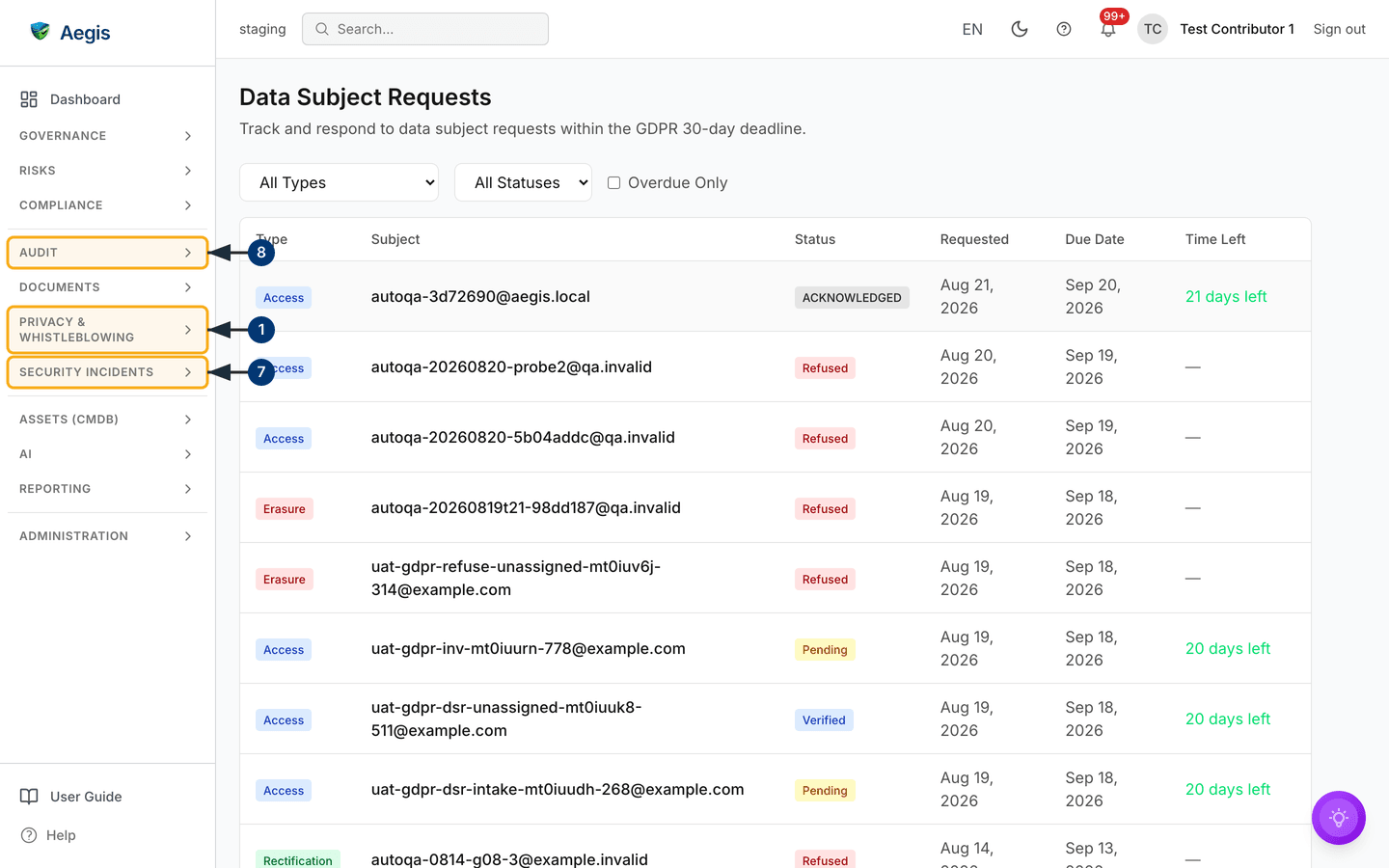
If you hold Manager rights, log it yourself. Open
GDPRin thePrivacy & Whistleblowinggroup, thenData Subject Requests, thenNew Requestat/gdpr/dsr/new. Choose the request type, enter the person's email address, and put the true received date inNotes— Aegis counts the deadline from creation, so the earlier legal date must be written down. - Expect questions back. Whoever works the request will need HR's help — what the personnel file holds, why it is kept, how long the retention schedule runs. The request's own page tracks the deadline; the countdown in the queue is the shared clock.
The full journey — acknowledgment, identity checks, gathering the data,
responding or refusing — is the
data-subject request scenario, with the module
reference in GDPR. A useful detail for HR: the GDPR
module's data-subject lookup searches the synced employee register by email, so
every row on /hr is personal data your organisation holds and must
be able to account for.
Tips and limits
-
Employee rows on
/hrdo not open into personnel files — there is no per-person detail page, training history or document store behind a name. The personnel file stays in your HR system. -
Training completions can be imported in bulk against a campaign (CSV of
email,completed_at, optionalscore) — useful after an induction round. See Security Awareness. -
The privacy switches and the retention figure on
Settings → HR Integrationsrecord your policy; they do not delete or anonymise records by themselves. Deletions follow your retention process in the source system. - A concern raised to HR about harassment or discrimination may belong in the whistleblowing channel instead of an HR file — it carries legal protections a mailbox does not. See Report a Concern.
Where this connects
The screens behind this chapter: HR Integrations, Security Awareness, GDPR and Settings. The joiner's own view of their duties is Scenario: an ordinary working week; the request you handed over continues in Scenario: handling a data-subject request. Roles and account management are covered in What each role can do, and terms glossed in brackets are in the glossary.